Turbo Native, for the desktop
Your Rails app is already the source of truth. Turbo Desktop wraps it in a thin native shell built on Tauri 2 — the same path configuration, bridge components, and progressive enhancement you know from Hotwire Native, now on macOS, Windows, and Linux.
Why it exists
Rails developers have had turbo-ios and turbo-android for years. Desktop was the gap. Turbo Desktop fills it without asking you to learn a new UI framework: your existing views, frames, and controllers keep working, and you reach for native only where it pays off.
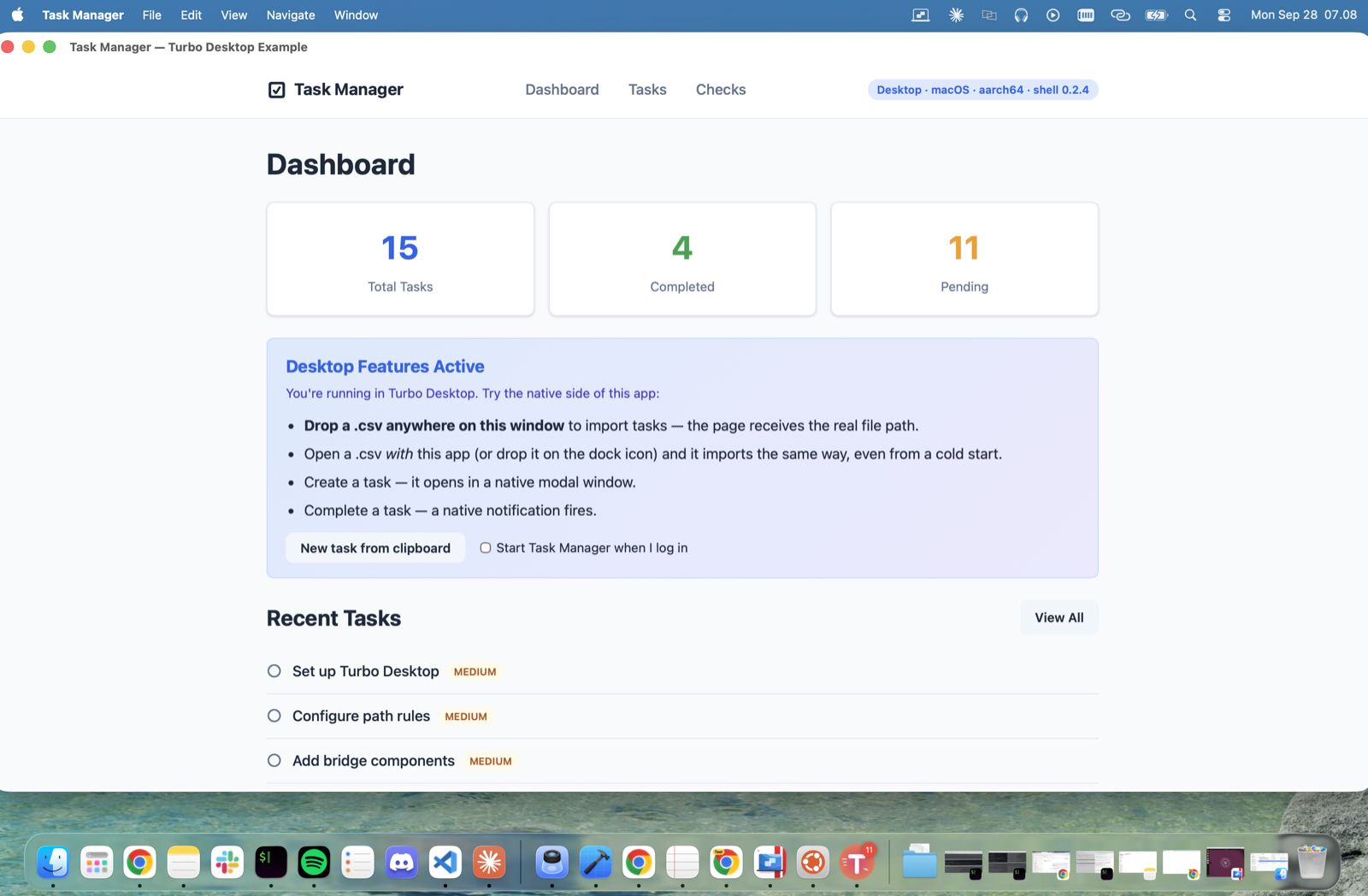
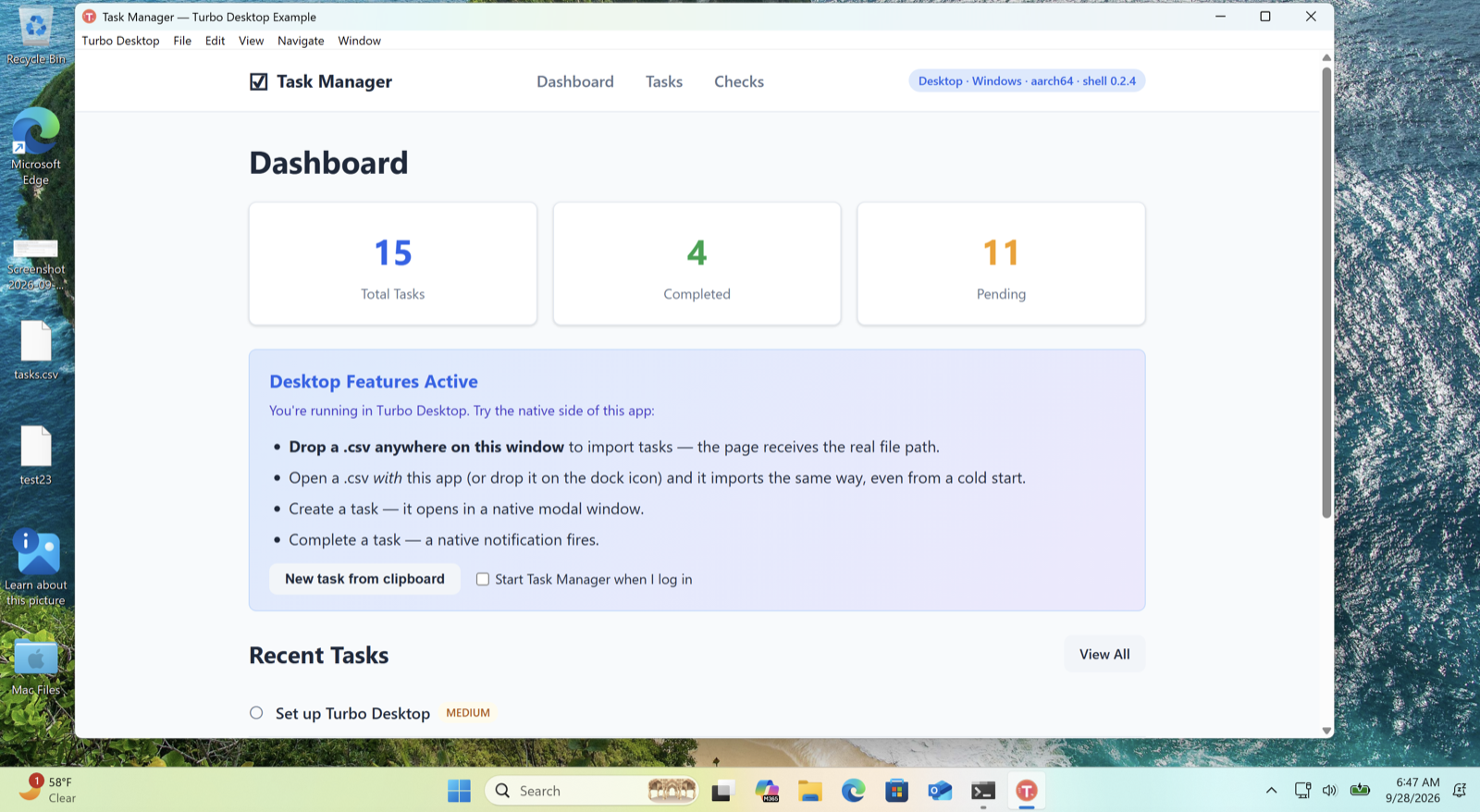
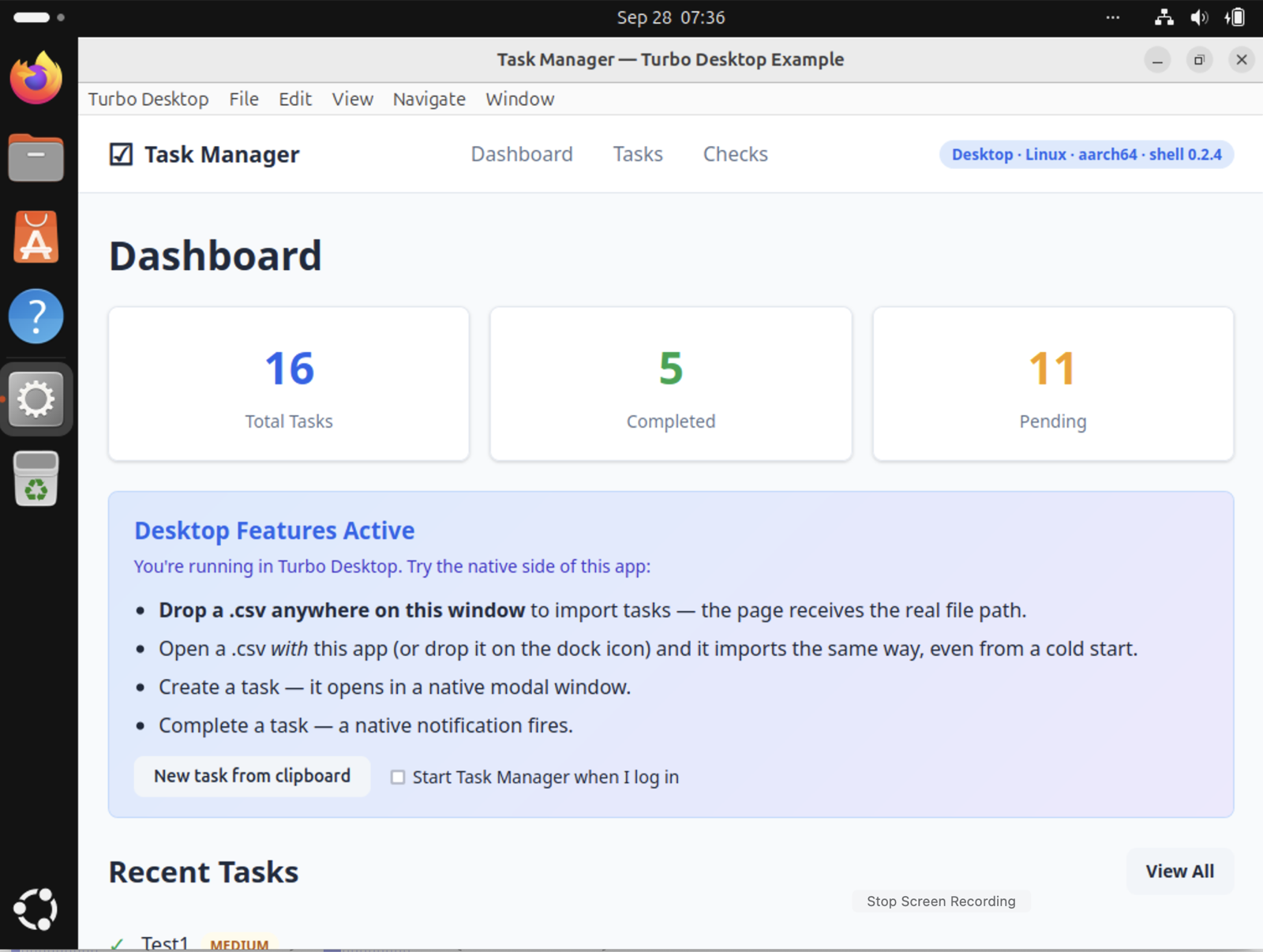
One Rails app, three shells. The badge in the corner of each window is what Rails was told about the shell it is in.
Quick start
Four steps to a running desktop shell, for a new Rails app or one you already have. You need Rails 7+, Ruby 3.2+, Node 18+, and a Rust toolchain.
Scaffold the shell
cargo install tauri-cli

npx turbo-desktop new myapp      # a new Rails app, with its shell
npx turbo-desktop init .         # or: add a shell to the app you are in
Both put the shell in desktop/, next to your Rails code. new also adds the gem, runs its installer, and mounts the engine, so steps 2 and 3 are already done for you.
Point it at your Rails server
{
  "server_url": "http://localhost:3000",
  "app_name": "My App",
  "server": { "command": "bin/rails server", "directory": ".." }
}
server_url is also the app's trust boundary: the bridge answers only pages served from that exact origin. Every key is described under Configuration.
Teach Rails about the shell
# Gemfile
gem "turbo_desktop-rails", "~> 0.2"

# bundle install
# rails generate turbo_desktop:install

# config/routes.rb — the installer adds this line
mount TurboDesktop::Engine => "/turbo-desktop"
<%# app/views/layouts/application.html.erb %>
<% turbo_desktop_only do %>
  <div class="titlebar-drag-region"></div>
<% end %>

<% turbo_web_only do %>
  <nav class="web-navbar">...</nav>
<% end %>
// app/javascript/application.js
if (window.TurboDesktop?.isNative) {
  document.documentElement.dataset.shell = "desktop"
}
Run it
cd desktop
npx turbo-desktop dev
The scaffolded config carries "server": { "command": "bin/rails server" }, so opening the app starts Rails too — and quitting stops it. A server you started yourself is left alone. The first run compiles the shell, which takes a few minutes; later runs start in seconds. Every Turbo visit from here on is proposed to the shell before it happens.
Configuration
One file, desktop/turbo-desktop.config.json, describes the app to the shell. Everything in it is closed by default and opened by naming what you need.
Starting the server with the app
With a server block, opening the app starts Rails too, so it behaves like an application rather than a viewer for something you have to run first.
{
  "server": {
    "command": "bin/rails server",
    "directory": ".."
  }
}
command runs through your shell on macOS and Linux, started the way a terminal starts it, so rbenv, asdf, nvm, or mise are set up as they are there — including when they live in ~/.zshrc. On Windows it runs through cmd: use ruby bin\rails server. directory is relative to the config file. If something already answers on server_url, the app uses it and leaves it running on quit; a server the app started is stopped when the app quits.
Where the file is read from
The file names the origin the bridge trusts, the filesystem roots, and the sudo allowlist. Reading it from the working directory of a shipped app would let anyone who can write a file beside it grant themselves all three. A config that exists but does not parse is always fatal.
What the user can change
Only the window size. The shell remembers the size the user left the app at and reapplies it on the next launch. That preferences file can hold nothing but geometry; position is not remembered, because a remembered position becomes an off-screen window as soon as the displays are rearranged.
Path configuration
A JSON document, served by Rails, that maps URL patterns to presentation rules. A rule may also set title, width, and height for the window it opens. Same concept and the same last-match-wins semantics as turbo-ios and turbo-android — the shell stays dumb, your server decides how screens appear.
{
  "settings": { "screenshots_enabled": true },
  "rules": [
    { "patterns": ["/"],               "properties": { "presentation": "default" } },
    { "patterns": ["/new$", "/edit$"], "properties": { "presentation": "modal", "title": "Edit", "width": 640, "height": 480 } },
    { "patterns": ["/reports/"],       "properties": { "presentation": "new_window" } },
    { "patterns": ["/settings"],       "properties": { "presentation": "native" } }
  ]
}
See each presentation
Pick a rule to watch what the shell does with the window.
When the server cannot be reached
The shell starts with rules rather than none. It uses the last copy the server gave, cached on the user's machine; failing that, the copy bundled with the app as desktop/path-configuration.json; failing both, everything takes the default presentation. The server's copy replaces whichever was loaded as soon as it arrives, and is asked for again whenever the server comes back — which, for an app that starts its own server, is a moment after launch. Keys the shell does not use are ignored, so one endpoint can serve the mobile shells too.
Windows & modals
A rule with modal or new_window opens the URL in its own window: 800×600 and 1200×800 unless the rule says otherwise. These windows carry everything the main one does — the user agent, off-origin links going to the browser, and a working bridge.
The three ways to dismiss are named after Hotwire Native's and mean the same. refresh() goes through Turbo when it is present, so scroll position and morphing survive. A modal is attached to the main window: it travels and closes with it, but the main window stays interactive. Windows opened with new_window stand alone.
Bridge components
The Bridge is the desktop equivalent of Strada: structured messages between a Stimulus controller in the WebView and a handler in Rust. Write the controller you would write for mobile, name the component, and the shell routes it.
A component that cannot do its job on the machine it is on answers status: "unavailable" with the reason, rather than failing. On Windows and Linux a link followed or a file opened while the app is running reaches the window that is already open.
Dropped files and OS-opened files also surface as DOM events — turbo-desktop:drop and turbo-desktop:file-open — so a Stimulus data-action is all a page needs.
A notification, end to end
// app/javascript/controllers/notify_controller.js
import { Controller } from "@hotwired/stimulus"

export default class extends TurboDesktop.stimulusBridge(Controller, "notification") {
  connect() {
    super.connect()
    this.sendBridge("connect", { title: "My App" })
  }

  notify(event) {
    this.sendBridge("connect", {
      title: "New Message",
      body: event.target.dataset.body
    })
  }

  receiveBridge(message) {
    console.log("Native says:", message)
  }
}
<%# Attach bridge data attributes to any element %>
<%= tag.button "Export PDF",
      **turbo_desktop_bridge("menu-item",
        title: "Export PDF",
        shortcut: "CmdOrCtrl+E") %>
// npm install turbo-desktop-bridge
import { stimulusBridge, isTurboDesktop } from "turbo-desktop-bridge"

if (isTurboDesktop()) {
  const info = await TurboDesktop.getWindowInfo()
  console.log(`Running on ${info.platform}`)
}
The turbo-desktop.js IIFE is injected into every page by the shell. The npm package only adds types and ESM exports over the same globals — nothing is bundled twice. It looks the shell up when it is used, so the same controller runs in a plain browser, where sendBridge resolves with null.
Files from the desktop
A browser never tells a page where a file lives. The shell does, and treats the way the file arrived as consent to read it.
// data-action="turbo-desktop:drop@document->importer#filesDropped
//              turbo-desktop:file-open@document->importer#filesDropped"
async filesDropped(event) {
  for (const path of event.detail.paths) {
    const { content } = await TurboDesktop.fs.read(path)
  }
}
Each of the three grants that path to the filesystem bridge for the session: one file for a file, everything inside for a folder. So “Save As… → Desktop” works without declaring ~/Desktop as a root. A file opened by double-click while the app was closed is queued until your page is up.
Owning a file type
{
  "bundle": {
    "fileAssociations": [
      { "ext": ["csv"], "description": "Data import", "role": "Viewer" }
    ]
  }
}
Dev Inspector
In development, press Cmd/Ctrl Shift D to open an in-app overlay over your running app.
# config/initializers/turbo_desktop.rb
config.inspector_enabled = Rails.env.development?

# app/views/layouts/application.html.erb, in <head>
# <%= turbo_desktop_inspector_meta_tag %>
The installer writes the first line for you. The meta tag is yours to add. Need the inspector against a build you cannot rebuild? Flip it on at runtime with localStorage.setItem("td:inspector", "1").
Requires turbo_desktop-rails 0.2.3 or later. Earlier versions answered 422 for the inspector's scripts in any app with forgery protection on, which is every app that uses load_defaults, so the overlay never opened. bundle update turbo_desktop-rails fixes it.
Connection loss
The shell watches your server and reports failures in Hotwire Native's vocabulary: network_failure, timeout_failure, http_failure, and page_load_failure mean here what they mean on mobile.
document.addEventListener("turbo-desktop:visit-error", (event) => {
  const { error, status, retry } = event.detail
  event.preventDefault()                 // suppress the shell's banner
  showMyOwnBanner(error, status, retry)  // retry() attempts the visit again
})
To take over entirely rather than case by case, add <meta name="turbo-desktop-error-handling" content="manual">. There is also turbo-desktop:connection, with { online, error }, for reacting to the connection itself. The shell notices all this rather than the page, because the browser's offline event fires when this machine loses its network, not when your server goes down.
Security
The bridge reaches the shell, the filesystem, and administrator privileges. It is closed by default and opened deliberately.
{
  "filesystem": {
    "allowed_roots": ["~/Projects"]
  },
  "sudo": {
    "enabled": true,
    "allowed_commands": ["softwareupdate", "brew install"],
    "confirm": true
  }
}
Before the system's own elevation prompt, which does not say what is about to run, the app shows the exact command and asks. Set confirm to false only if your app already asks. Elevation uses each platform's mechanism: the macOS password dialog, polkit on Linux, UAC on Windows — where an elevated command's output arrives whole when it finishes rather than line by line.
Rails gem
The turbo_desktop-rails gem gives your app shell awareness. Detection reads the User-Agent, e.g. Turbo Desktop/0.2.4 (macOS; aarch64).
A whole template for the desktop
Requests from the shell carry a Rails variant, so a view can be written for it instead of branching inside a shared one. Rails falls back to the plain template wherever no variant exists.
app/views/orders/show.html.erb            # everyone
app/views/orders/show.html+desktop.erb    # the desktop app
app/views/layouts/application.html+desktop.erb
Configuration
Requires Ruby 3.2 or later and Rails 7.0 or later. Pin the gem to the minor version, as the CLI does: gem "turbo_desktop-rails", "~> 0.2".
# config/initializers/turbo_desktop.rb
TurboDesktop.configure do |config|
  config.path_configuration = {
    settings: { screenshots_enabled: true },
    rules: [
      { patterns: ["/"],                 properties: { presentation: "default" } },
      { patterns: ["/new$", "/edit$"],   properties: { presentation: "modal" } },
      { patterns: ["/settings"],         properties: { presentation: "native" } }
    ]
  }
end
JavaScript API
Everything hangs off window.TurboDesktop, injected by the shell on every page load. Outside the shell it is undefined — guard with isTurboDesktop().
CLI
Scaffolding and running, no clone required.
npx turbo-desktop new myapp --icon ./logo.png
npx turbo-desktop build --target universal-apple-darwin
Each scaffolded app gets its own name, bundle identifier, and deep-link scheme, so two apps built on the shell do not share preferences or answer each other's links. New apps are pinned to turbo_desktop-rails "~> 0.2".
Shipping
A Turbo Desktop app is a Tauri app, so shipping means native installers per OS.
Your icon
cd desktop
cargo tauri icon path/to/your-icon.png
One square PNG, 1024×1024, transparent background. The generator writes every size and format, and tauri.conf.json already points at them.
Installers
npx turbo-desktop build      # this machine's platform

git tag v1.0.0 && git push origin v1.0.0   # every platform, in CI
Tauri cannot cross-compile, so the release workflow builds macOS, Windows, and Linux on their own runners and attaches the installers to a draft GitHub Release. Copy it into your app's .github/workflows/. Set server_url to your production URL before building.
Signing
Builds are unsigned by default. They run, but macOS Gatekeeper and Windows SmartScreen warn about them. Signing is also what makes the bundled config tamper-resistant. The distribution guide covers signing, notarization, and auto-update.
How it compares
Same mental model as the mobile shells, different runtime underneath.
 MIT licensed. Built with Tauri, Hotwire, and Ruby on Rails.